v3.0.0 · MIT · Docker only
Send personalized WhatsApp messages to a list of business leads from a point-and-click dashboard. It drives a real WhatsApp Web session inside a container — you watch it happen in your browser. Built for outreach to people who expect to hear from you.
docker run -d --name wa -p 5000:5000 -p 6080:6080 -v "$PWD/data:/app/data" ghcr.io/firaslamouchi21/whatsapp-automation-tool:latest Built because pasting the same message into WhatsApp Web by hand, one lead at a time, gets old fast.
Read this before you send anything
Do not exceed ~100 messages per day. WhatsApp bans accounts for bulk sending — mine got banned after 40 messages in one day. This tool puts a delay between messages, but you are responsible for how you use it. This is for your own outreach to people who expect to hear from you — not for spam.
How it works
There's no unofficial API and no reverse-engineered protocol. The container runs Chromium on a virtual display; WhatsApp Web loads in it exactly as it would on your desktop. That screen is streamed to your browser over noVNC, so you scan the QR code once and can watch — or take over — at any point.
A headful browser on a virtual framebuffer inside the container — WhatsApp Web sees a normal browser.
The browser's screen, streamed to http://localhost:6080/vnc.html. Scan the QR with your phone to link the session.
Templates, leads and campaigns. Starts the run in a background thread with a live progress bar.
The workflow
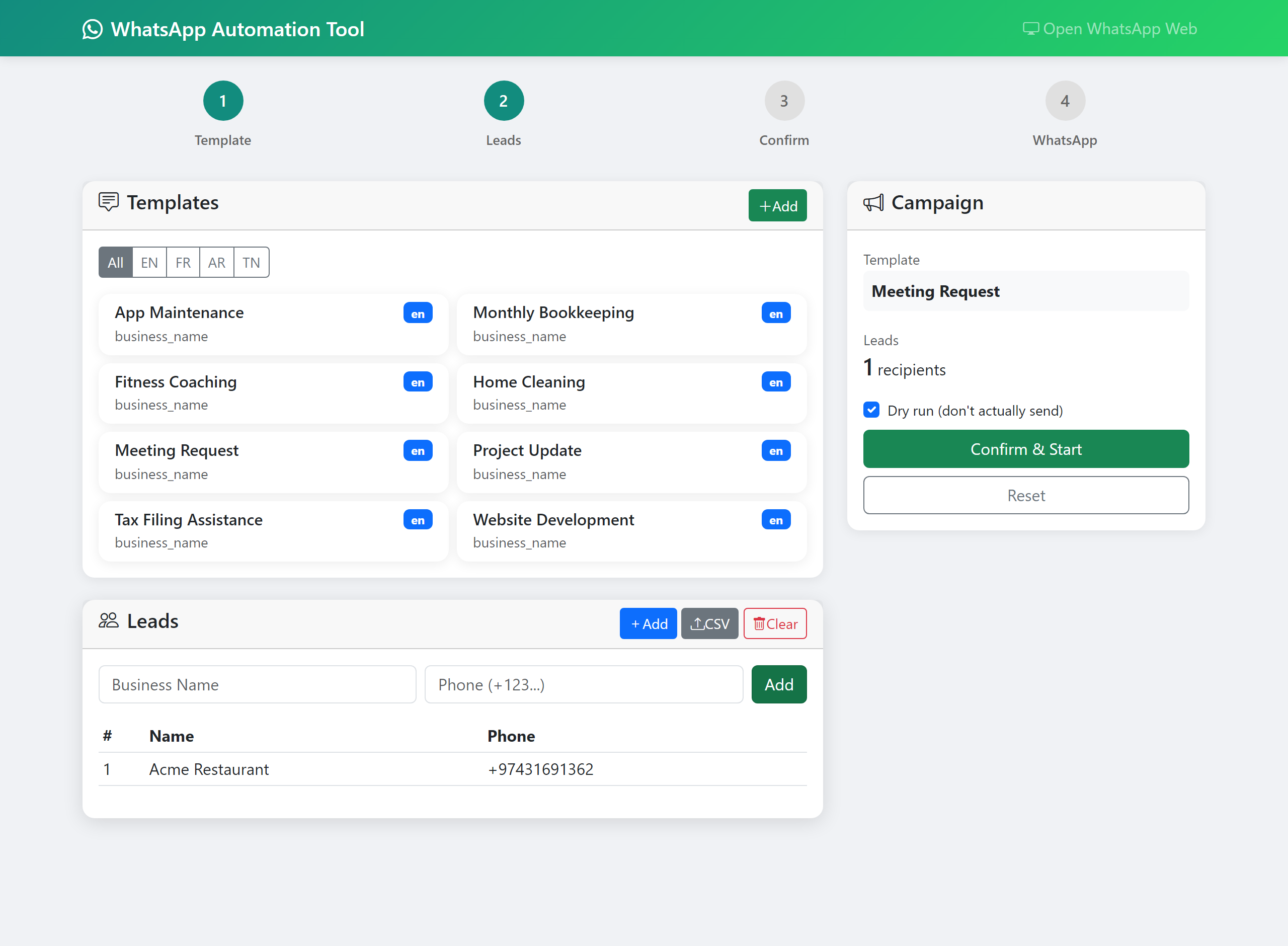
Pick one of the built-in templates or add your own. Filter by language.
Upload a CSV or type leads in. Every phone number is validated and normalised to E.164.
See every message rendered with the lead's name filled in. Dry-run is checked by default.
Open the in-container browser, scan the QR with your phone, watch the messages send.
Templates
Templates live as YAML with {business_name} and {category} placeholders. Eight templates per language across four categories — accounting, IT, work, life — in English, French, Arabic and Tunisian. Add your own from the dashboard or by dropping a file in templates/<lang>/<category>/.
| Language | Code | Templates |
|---|---|---|
| English | en | 8 across 4 categories |
| French | fr | 8 across 4 categories |
| Arabic | ar | 8 across 4 categories |
| Tunisian | tn | 8 across 4 categories |
meeting_request:
  name: "Meeting Request"
  template: |
    Hi {business_name},

    I'd like to schedule a short call to
    discuss how we can work together.
    Are you free for 15 minutes this week?
  variables: ["business_name"]
  language: en
Leads
At least a name and a phone number. The Category
column is optional and feeds the {category}
placeholder. Every number is checked and normalised to E.164 with the
phonenumbers library before anything is sent.
Business Name,Phone Number,Category
Acme Restaurant,+974 3169 1362,Food
Blue Cafe,+974 5088 5757,Food
Run it
No installation — just Docker. Port 5000 is the dashboard, port 6080 is the in-container browser. Mount ./data so your templates, leads and the linked WhatsApp session survive a restart.
run it
docker run -d --name wa -p 5000:5000 -p 6080:6080 -v "$PWD/data:/app/data" ghcr.io/firaslamouchi21/whatsapp-automation-tool:latest then open
| localhost:5000 | the campaign dashboard |
| localhost:6080/vnc.html | WhatsApp Web inside the container — scan the QR here |
or with compose
services:
  whatsapp-automation:
    image: ghcr.io/firaslamouchi21/whatsapp-automation-tool:latest
    ports:
      - "5000:5000"
      - "6080:6080"
    volumes:
      - ./data:/app/data
      - ./templates:/app/templates
    environment:
      - WHATSAPP_RATE_LIMIT=20
      - SECRET_KEY=change-me
    restart: unless-stopped
CLI
# docker exec wa python main.py --list-templates # docker exec wa python main.py --validate-leads data/leads.csv # docker exec wa python main.py --leads data/leads.csv --template meeting_request --dry-run | --leads PATH | CSV of leads (Business Name, Phone Number, optional Category) |
| --template NAME | template id — see --list-templates |
| --dry-run | render and log every message, send nothing |
| --start N / --end N | process only a slice of the CSV |
| --validate-leads PATH | check phone numbers and exit |
| --output PATH | write a per-lead result CSV |
Configuration
| Variable | Default | Meaning |
|---|---|---|
| WHATSAPP_RATE_LIMIT | 20 | seconds between messages |
| WHATSAPP_WAIT_TIME | 10 | seconds to wait for a chat to load in WhatsApp Web |
| SECRET_KEY | dev key | Flask session key — set this if you expose the dashboard |
| LOG_LEVEL | INFO | DEBUG / INFO / WARNING / ERROR |
| WA_DEBUG | off | set to 1 for the Flask debugger (local only) |
Or mount config/config.yaml for the full shape.
v3.0.0
SameSite=Lax session cookie.src/ + config/), up from 13.phonenumbers.v3.0.0 is a beta. The full community release is a few months out — issues and PRs are the most useful thing you can send.
Contact
A question, a bug, or you want to help get it to a full release — this goes straight to Firas's inbox and you'll get an auto-reply to confirm.